Link to my LinkedIN.
https://www.linkedin.com/in/sophie-neerup-larsen-45b01990/
Hire Me
My name is Sophie, and I am a Ui & UX designer from Copenhagen Denmark, I am looking for new exciting challenges!
sophienlarsen@yahoo.dk
Made in connection with employment with Delegate.
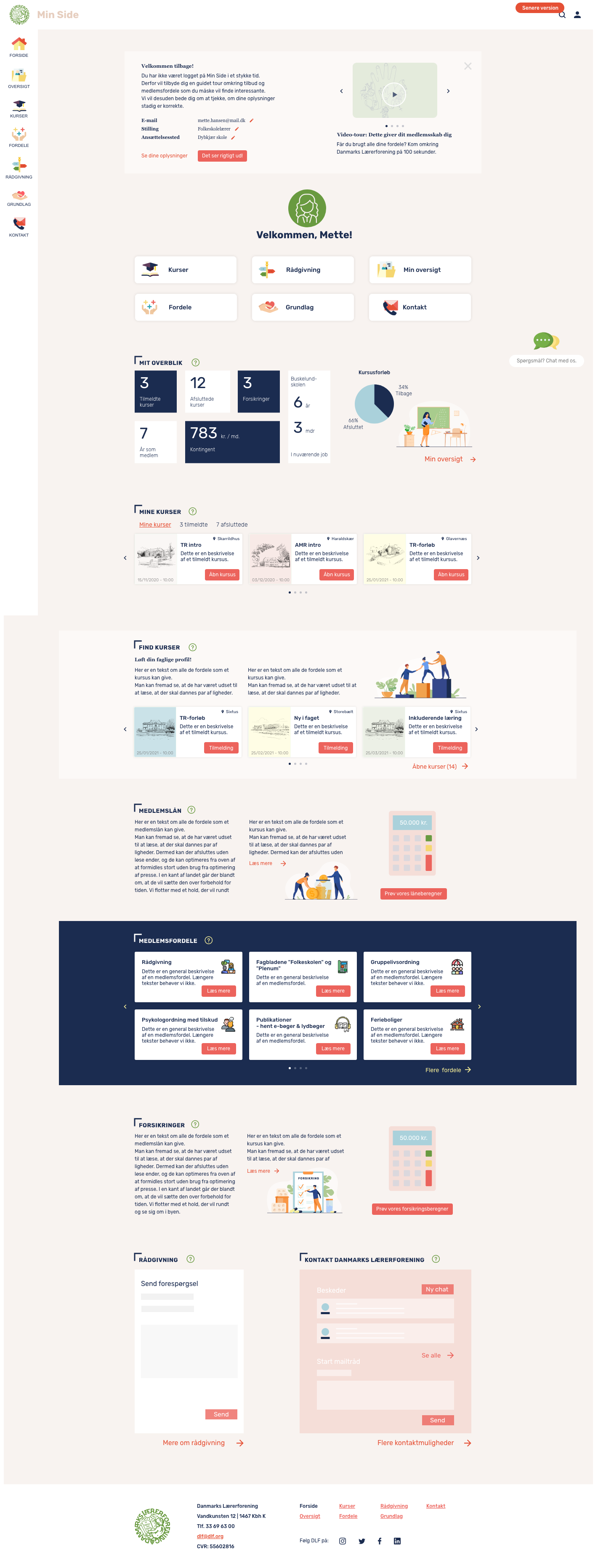
Inclusive UI & UX with role-based prototypes for diverse user types
As part of a larger digital transformation project for Danmarks Lærerforening (The Danish Union of Teachers), I was responsible for designing the final version of a new member page. The page serves as a key portal for members to manage their profiles, access documents, stay informed, and receive relevant offers – tailored to their specific role and life stage. The goal was to create a highly usable and accessible interface that worked seamlessly across a wide user base with varying levels of digital literacy and needs.
We conducted a thorough user research process including:
Key insight: the user base was highly diverse – including students, part-time workers, full-time teachers, retirees, and unemployed members. This called for a highly inclusive and adaptable interface.
We developed 4 key personas:
Each persona informed specific journeys and access permissions. We ensured their needs were met through content hierarchy, login-based customization, and clear language.
The final design features:
Each element was built with scalability in mind for future feature expansion.
The final design was delivered as a complete clickable prototype, ready for development. It was presented to both the internal project team and executive stakeholders, and received very positive feedback on:
Key learning: Inclusive design is not only about accessibility – it’s about understanding complexity and diversity within user communities